Manual.ly Logo

Raidon InTANK iR2623-S3 Shiyong-Shuomingshu

0.0 · 0 评分

PDF 手册 · 25 页

中文

M: QW-35-FL
页面

/ 25

Loading...
a76c48f6eda3818ea8e47d1632de85e1a408 page 9
iR2623-S3 User Manual
7
The hard drive Hot Swap and Auto Rebuilding functions are available.
O󰀨-line Back up When the data is stored within IR2623-S3, the user can remove one of the hard
drives from IR2623-S3 as back up drive for data such as system operation le, secured les, seldom
modified files or image and music files. The user can periodically insert the hard drive back into
IR2623-S3 to execute automatic backup to protect the system from being hit by computer virus or to
avoid risk of having both hard drives failing at the same time.
When one of the two hard drives fails in the IR2623-S3 system, the system will alarm the hard
drive failure message both on the LCD display screen and in the monitoring software. The user can
remove the failed hard drive from the system while the system is still in operation without shutting
down the machine. If the failed hard drive is replaced shortly, the system will automatically execute
the Auto Rebuilding function without affecting the system operation and without any operation
command from the user.
When the IR2623-S3 detects a hard drive missing or a hard drive failure, the Buzzer will start and the
LCD display screen will display the following messages:
After removing the failed hard drive and replacing with a new hard drive, if the hard drive is properly
installed, the LCD display screen will display the following messages:
After few seconds of installing the new hard drive, the LCD display screen will display the data
rebuilding progress:
When the rebuilding is fully completed, the LCD display screen will again display the following
messages:
8. Data Rebuilding Operation
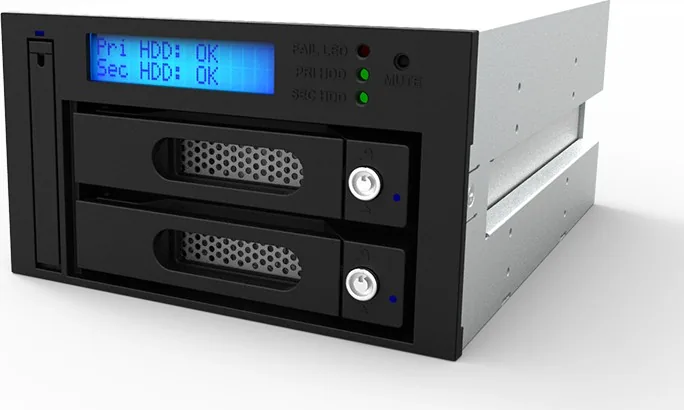
Pri HDD : OK
Sec HDD : OK T
RAID-1 degraded
Pri : X Sec : O
Pri HDD : OK
Sec HDD : Insert
Rebuilding
Sec
→
Pri 32%
Pri HDD :Insert
Sec HDD : OK
Rebuilding
Pri
→
Sec 32%

使用 AI 与您的 Raidon InTANK iR2623-S3 手册聊天

从您的 Raidon InTANK iR2623-S3 手册中获取即时 AI 答案

询问有关 Raidon InTANK iR2623-S3 的任何问题。答案来自本手册及其所依据的页面。

InTANK iR2623-S3 维护计划

定期
将重要数据备份到独立设备

强烈建议定期或在必要时将重要数据备份到远程或独立的存储设备。

在手册中显示 (第 5 页)
每隔一段时间
通过重新插入离线驱动器执行自动备份

定期将取出的备份硬盘重新插入设备,以执行自动备份并防范病毒攻击或同时发生的故障。

在手册中显示 (第 9 页)
M: qwen/qwen3.8-flash

提问 问题

0/1000

您会推荐 InTANK iR2623-S3 吗?

是 否

常见问题 问题

A

更改RAID模式将导致这些驱动器上的所有数据丢失。您必须在重新配置模式之前备份所有数据。

此回答有帮助吗?

A

可以,但总可用容量将受限于较小驱动器的大小。较大驱动器的额外空间将保持未使用。

此回答有帮助吗?

A

当故障驱动器被替换时,系统会自动将数据从幸存的驱动器复制到新驱动器,无需用户干预。

此回答有帮助吗?

A

是的,iR2623-S3通过可拆卸托盘支持2.5英寸和3.5英寸SATA硬盘。

此回答有帮助吗?

A

检查LCD显示屏,验证SATA电缆连接,并确保BIOS设置为自动检测驱动器。如果问题持续存在,请检查兼容性问题。

此回答有帮助吗?

A

技术上不会,但如果源驱动器有坏扇区,复制过程中特定扇区的数据可能会丢失。

此回答有帮助吗?

M: QW-35-FL

優勢 和 劣勢

优势

  • 通过后部跳线支持灵活的RAID 0和RAID 1配置
  • 配备LCD屏幕用于实时监控和错误监控
  • 支持在不关闭系统的情况下热插拔驱动器
  • 包括驱动器更换后的自动数据重建
  • 提供带有电子邮件通知和S.M.A.R.T.监控的GUI软件
VS

缺点

  • RAID 1中的总容量受所安装的最小驱动器限制
  • 如果操作不当,固件更新可能导致故障
  • 更改RAID模式时需要重启系统
  • 如果混合使用不同制造商的驱动器,性能可能会下降
  • RS232端口设置需要特定的知识才能进行工业集成
M: QW-35-FL

产品 规格

类型

柜

内部连接

2x 3.5"英寸 SATA 6Gb/s, 1x 2.5"英寸 SATA 6Gb/s

外部连接

SATA 6Gb/s

热插拔

否

磁盘抽斜

2x 5.25"英寸

柜体散热

1x 风扇 (2.4英寸)

电源供应

1x 4针 Molex

锁

是

特性

显示屏, RAID (0/1)

M: QW-35-FL

产品 描述

了解RaidSonic Raidon InTANK iR2623-S3内部RAID模块

RaidSonic Raidon InTANK iR2623-S3是一款坚固的内部存储解决方案,专为在数据管理中要求可靠性和灵活性的用户设计。该SATA 6Gb/s模块支持两块硬盘,提供多种配置选项以满足各种需求,从高速性能到关键数据冗余。

多功能RAID配置

iR2623-S3的突出特点之一是它可以通过后部面板上的简单跳线设置在RAID 0和RAID 1模式之间切换。在RAID 0模式下,系统将两个驱动器的容量合并为单个卷,提供更快的读写速度,非常适合媒体编辑或大文件传输。相反,RAID 1模式将数据镜像到两个驱动器上,确保如果一个驱动器发生故障,您的数据在其他驱动器上仍然安全。这种镜像模式为存储重要文件提供了必要的安心感。

用户友好的监控和维护

该设备配备直观的LCD屏幕,可显示实时状态信息。用户可以轻松监控驱动器健康状况、查看重建进度并识别错误,例如风扇故障或过热条件。内置蜂鸣器会立即提醒您任何硬件问题。此外,热插拔功能允许您在不停机的情况下更换故障驱动器,触发自动数据重建过程以无缝恢复冗余。

高级软件集成

为了获得更深的控制,iR2623-S3包含可通过CD访问的GUI监控软件。此工具提供全面的系统状态检查、S.M.A.R.T.诊断和固件更新功能。它还支持电子邮件通知,允许管理员接收关于驱动器故障或移除的即时警报。RS232端口的加入进一步使工业控制系统能够远程监控硬件状态,使其适合专业环境。

安装与兼容性

安装非常简单,只需要标准的SATA电缆和电源连接。该单元支持2.5英寸和3.5英寸驱动器,为不同的存储外形尺寸提供灵活性。虽然系统接受来自不同制造商的驱动器,但建议使用相同型号以获得最佳性能和容量利用率。始终确保驱动器在安装前没有坏扇区,以防止数据丢失。

关键说明

  • 支持SATA I、II和III接口。
  • 更换驱动器后自动重建数据。
  • 支持电子邮件通知以实现主动维护。
  • 需要BIOS设置为AUTO以进行检测。
M: QW-35-FL

© Copyright 2026 Manual.ly