

Oclean免费使用说明书 – 在线阅读、下载和打印
1 手册
手册
分类

Comprehensive Guide to Oclean Manuals
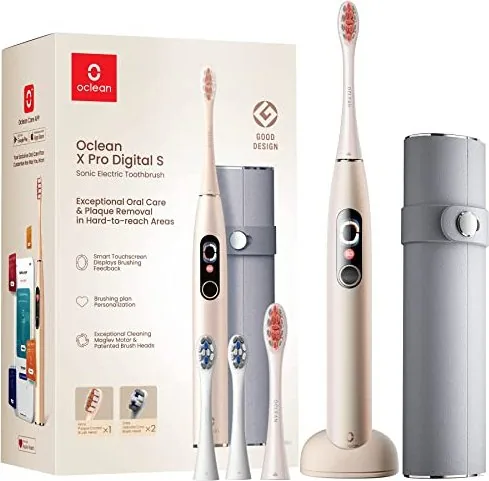
Electric toothbrushes have revolutionized daily oral hygiene, offering advanced technology to ensure clean teeth and healthy gums. Among the leading brands in this sector is Oclean, which produces a wide range of smart electric toothbrushes designed for efficiency and durability. To fully utilize the features of these devices, understanding the accompanying documentation is essential. The Oclean Manuals serve as the primary resource for owners, providing step-by-step instructions, troubleshooting tips, and maintenance guidelines.
Locating Your Specific Manual
The first step in utilizing the Oclean Manuals effectively is identifying the correct document for your specific device model. Oclean releases several products, including the Air, X, and Pro series. Each model comes with unique features that may require detailed explanation. Users can typically find the manual on the official Oclean website. The support section usually contains a dropdown menu where you select your model number to download the PDF version. Alternatively, new users often find a QR code inside the product packaging or on the included instruction card. Scanning this code directs the user to the digital version of the manual on a mobile browser.
Reading the physical copy is also an option for those who prefer not to carry digital files. This ensures that you have access to information even without internet connectivity. It is important to save the digital manual to your device or cloud storage. This prevents loss if the physical copy gets damaged or misplaced. Keeping the manual handy allows you to reference warranty policies and safety warnings whenever necessary.
Initial Setup and Application Pairing
Setting up a new Oclean toothbrush requires attention to detail to ensure all smart features function correctly. Begin by fully charging the device before your first use. The manual specifies the recommended charging duration, which is usually around four hours. Once charged, you must install a new brush head by snapping it onto the magnetic coupling. Ensure a firm click to confirm proper attachment.
The next critical step involves pairing the brush with the Oclean mobile application. The app acts as a central hub for tracking hygiene habits and customizing settings. Turn on Bluetooth on your smartphone and open the registered account within the app. Activate the pairing mode on the toothbrush, which may involve holding a specific button. The app will search for available devices and connect to the toothbrush automatically.
Follow the on-screen prompts to complete the initial setup. This often includes setting a password for the device and configuring user profiles for family members. The manual provides screenshots that guide you through this interface, ensuring no confusion occurs during the process. Once paired, the toothbrush will sync brushing data. Regular software updates via the app ensure the device remains up to date with the latest improvements.
Optimizing App Integration and Data Tracking
Oclean apps offer extensive data tracking capabilities that improve with every update. The Oclean Manuals detail how to navigate the dashboard to view brushing history. Users can see session durations and missed spots. This feedback loop helps refine brushing technique over time.
Setting up customized schedules makes daily routines easier. The application sends reminders based on your preferred intervals. You can also track the health of each toothbrush head. Syncing across multiple family logins allows a single account to monitor different users effectively. Reviewing the weekly or monthly reports provided by the app can highlight habits that need improvement. It is beneficial to share this data with dentists if you are seeking professional advice. The manuals explain how to export data files for offline viewing.
Understanding Cleaning Modes and Pressures
Oclean toothbrushes are equipped with various cleaning modes to suit different needs. The standard manual details each mode and its specific vibration or rotation patterns. Common modes include Gentle for sensitive gums, Standard for general cleaning, Deep Clean for thorough plaque removal, Polish for stain reduction, and Massage to stimulate the gums. Selecting the correct mode depends on your personal comfort and dental requirements.
Pressure sensors are a key feature found in many Oclean models. The manual explains how the device alerts you when you apply too much force. This protection prevents gum recession and enamel damage. Visual cues often involve flashing lights on the handle, while the app may display a warning icon. Users should practice applying gentle pressure until the sensor activates. This ensures the brush does the work rather than forcing it into the mouth. Adjusting the intensity level within the app allows further customization for children or those with sensitive teeth.
Maintenance and Brush Head Replacement
Longevity of the device depends heavily on proper maintenance. The Oclean Manuals emphasize regular cleaning of the toothbrush handle. After every use, rinse the handle under running water. However, submerging the entire unit is not advised unless the manual specifies an IP rating for submersion. Wipe the handle dry with a clean cloth to prevent water damage or battery corrosion.
Brush head replacement is another vital maintenance task. The recommended interval for changing the head is every three months. This is the standard guideline for maintaining hygiene and effectiveness. Overused bristles become less efficient at removing plaque and can harbor bacteria. The manual suggests marking the date of replacement on a calendar or setting a reminder on your phone. Some Oclean models feature indicators that remind users when the head is nearing the end of its life. This visual cue helps maintain consistent dental care routines.
Store the toothbrush upright in a dry place. Avoid covering the head with plastic caps for extended periods as this promotes bacterial growth. If traveling, use the provided travel case to protect the head from physical damage. Proper storage ensures the device stays ready for immediate use whenever you return home or travel.
Safety Precautions and Battery Management
Battery safety is paramount when handling rechargeable devices. The Oclean Manuals provide specific guidelines on charging environments. Never leave the device charging unattended for excessively long periods. Avoid exposing the charging base to extreme temperatures. Do not use the charger if the cable shows signs of fraying or damage.
Waterproof ratings vary by model. Always check the IP rating listed in the manual before washing the unit. While many models are water-resistant, using high-pressure water jets can force moisture into internal components. Drying the device thoroughly after washing is necessary.
Keeping small children away from charging cables is also advised to prevent choking hazards. If the device gets hot during charging, unplug it immediately. Contact support if overheating persists. These safety measures protect both the user and the product from potential electrical or physical hazards.
Troubleshooting Common Issues
Even with advanced technology, occasional troubleshooting may be required. The manual includes a dedicated troubleshooting section to resolve connectivity and charging problems. If the toothbrush does not charge, inspect the USB cable and the charging port for debris. Ensure the contacts on both the charger and the handle are clean and dry. Try a different power outlet or USB adapter if the charging rate seems slow.
Bluetooth pairing issues often stem from distance or interference. Ensure the smartphone is within range of the toothbrush. Restart the Bluetooth setting on your phone and disconnect the device before attempting to reconnect. If the toothbrush does not turn on, it may be fully drained. Charge it completely before testing again. If the vibration is unusually weak, the motor might be damaged, requiring contact with customer support.
Understanding error codes is critical for self-diagnosis. The manual decodes various LED flash patterns. For instance, multiple flashes might indicate a blockage or a loose brush head. Following the resolution steps listed can save time and prevent unnecessary shipping for repairs. If the app fails to sync data, check your internet connection and ensure the app has necessary permissions. Reinstalling the application can often resolve data synchronization glitches.
Warranty and Support Contacts
Oclean provides a warranty for its electrical products, but it requires registration and proper usage documentation. The manual outlines the duration of the warranty, which typically covers manufacturing defects. Keep your proof of purchase handy when filing a claim. The contact information for support is usually listed in the final pages of the manual. Email forms and live chat options are often available for quicker resolution.
Community forums and FAQs are also provided for peer support. Reading experiences from other users can offer additional tips not covered in the technical documentation. Always verify information against the official manual to ensure safety and compliance. Adhering to the guidelines ensures your product remains valid under warranty terms.
In conclusion, the Oclean Manuals are invaluable tools for maximizing the performance of your electric toothbrush. Understanding setup, maintenance, and troubleshooting ensures a seamless experience. Regular access to updates and documentation keeps you informed about the best practices. By following these instructions rigorously, users maintain optimal oral hygiene and extend the lifespan of their valuable device.
搜索:67,732 在线手册


输入品牌或型号