3.因为硬盘LED 外送讯号的规格根据不同硬盘厂商会有所不同,产品的LED 指示灯灯号。
如果数据读写没有问题,则不影响操作,如果LED 指示灯不亮亦无法读写数据,请联络我们。
4.若欲完全使用Hot-swap 的功能,则Host 端也需要支持Hot-swap 功能。
5.如欲知更多产品资讯,欢迎上网浏览本公司网站:http://www.icydock.com
1.本公司保留产品升级与变更之权利,如改版,恕不另行通知。
2.本公司仅负责ICY DOCK 产品本身相关的维修。任何跟其它软件、硬件、数据相关的故障请联络其相关
公司协助维修。
5.如欲知更多產品資訊,歡迎上網瀏覽本公司網站:http://www.icydock.com
3.因為硬碟
LED外送訊號的規格根據不同硬碟 ,部分硬碟可能不支持產品 的LED 指示燈燈號 。
如果數據讀寫沒有問題,則不影響操作,如果
LED指示燈不亮亦無法讀寫數據,請聯絡我們。
4.若欲完全使用Hot-swap 的功能,則Host 端也需要支持Hot-swap 功能
。
2.本公司僅負責ICY DOCK 產品本身相關的維修。任何跟其它軟體、硬體、資料相關的故障請聯絡其相關
公司協助維修。
1.本公司保留產品升級與變更之權利,如改版,恕不另行通知。
4. Para utilizar la función de intercambio en caliente, el dispositivo principal también debe admitir esta f
unción. Para comprobar sea el dispositivo principal admite la función de intercambio en caliente,
consulte las especificaciones y el manual del usuario de la placa base o de la tarjeta controladora.
5. Si tiene alguna pregunta o duda acerca de los productos ICY DOCK, visite nos en el sitio web
http://www.icydock.com
3. Debido a las diferentes especificaciones de las unidades para la señal de acceso a dichas unidades,
algunas de estas puede que no admitan el LED de acceso. Si el LED no funciona pero el usuario
puede realizar operaciones de lectura y escritura en la unidad, dicho LED se encuentra dentro de
esta categoría. Si el LED no funciona y no se pueden realizar operaciones de lectura o escritura en la
unidad, póngase en contacto con nosotros para solucionar el problema.
4. フルでHot-Swap機能を使用する場合、Host側もHot-Swap機能に対応する必要があります。
5. ICY DOCK製品に関するお問い合わせは弊社のホームページ:http://www.icydock.comへアクセスしてください。
3. HDD出力信号仕様はメーカーにより異なります。場合によって一部分HDDが本製品のLEDランプに対応できな
い場合があります。
読み書きできない場合、問い合わせください。
2. 当公司はただICY DOCK製品自身と関連している修理だけ責任を負います。いかなるとの他のソフ卜ウェア、
データと関連している故障はその関連している会社と連絡し、修理を協力して下さい。
1. 当公司は
NOTA
REMARQUES
注釋
4. To utilize the hot swap function, the host must also support hot swap. To check if your host supports
hot swap, please refer to the motherboard or controller card specifications and documentation.
5.
1.
Due to different drive specifications for the drive access light signal, some drives may not support the
access LED. If the LED does not function, but the user is able to read and write to the drive, it would fall
under this category
contact us for troubleshooting.
IcyDock will not be liable for any software, hardware, or data stored or interfacing with IcyDock product
resulting into damages or malfunctions. IcyDock is only responisble for repairs and services of IcyDock
products.
2.
3.
5.
4. Um Hot Swap zu nutzen muss diese Funktion von dem Host unterstützt werden. Konsultieren Sie
hierfür bitte die Bedienungsanleitung Ihres Mainboards oder Ihrer Controller-Karte.
3. Auf Grund unterschiedlicher Spezifikationen kann es vorkommen, dass manche Laufwerke das
HDD-Zugriffssignal nicht unterstützen. Dieser Fall trifft zu, wenn Sie Lese- und Schreibzugriff auf das
Laufwerk haben, die LED aber kein Zugriffssignal anzeigt. Sollten Sie keinen Lese- und Schreibzugriff
auf das Laufwerk haben und die LED auch nicht funktionieren, so kontaktieren Sie uns bitte zur zur
Fehlerbehebung.
1. ICY DOCK
2. I
1. ICY DOCK se reserva el derecho de cambiar las especificaciones técnicas no relacionadas y está
sujeto a cambio sin previo aviso.
2. ICY DOCK no asumirá ninguna responsabilidad por ningún software, hardware o dato almacenado
en los productos ICY DOCK, o que interactúe con estos, que provoque daños o averías. ICY DOCK
solamente asumirá la responsabilidad de reparaciones y tareas de servicio de productos ICY DOCK.
2. ICY DOCK ne pourra être tenu responsable de la perte ou dégradation de tout logiciels, matériels ou
données suite à des dommages ou des disfonctionnements de matériels utilisés avec nos produits
ICY DOCK. La responsabilité de ICY DOCK ne pourra être engagées que pour ces propres produits.
1. ICY DOCK
4. Pour profiter pleinement la fonction Hot-Swap, vérifiez que votre configuration accepte également la
fonction Hot-Swap.
3. A cause des différentes spécifications des signaux d'accès, certains disques durs ne supportent pas
l'accès. Si la LED témoin ne s’allume pas, alors le disque dur n’est pas pris en charge, contactez-nous
pour un dépannage.
5. Si vous souhaitez obtenir plus d’informations sur nos produits, vennez visiter notre site:
http://www.icydock.fr
Copyright
©
ICY DOCK International. All Rights Reserved. 650238 VER 1.0
ToughArmor
Full Metal 16 Bay 2.5" SAS / SATA HDD & SSD Backplane Cage
1
2
3
4
5
6
7
8
1
2
3
4
5
6
7
8
1
Contenu
包裝說明
包装说明
Contenido
del paquete
Package Contents
Packungsinhalt
User Manual
2
機體說明 机体说明
Información del dispositivo
本体説明
Device Information Geräteinformationen
Informations dispositif
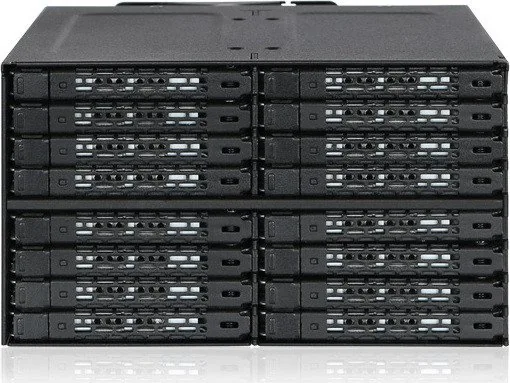
Front View
8 x M3*4 Pan Head Screw for Device
2 x Screw for spare
10
x
64 x M3*4 Flat Head Screw for 2.5" HDD/SSD
2 x Screw for spare parts
66
x
1. Drive tray ejection button
2. LED indicator (device power: solid green light; HDD access: blinking green light)
3.
1
2
1
2
3
3
Device Drive ID Plug
2PCS
WARNING: Please use the included screws to secure the drive(s).
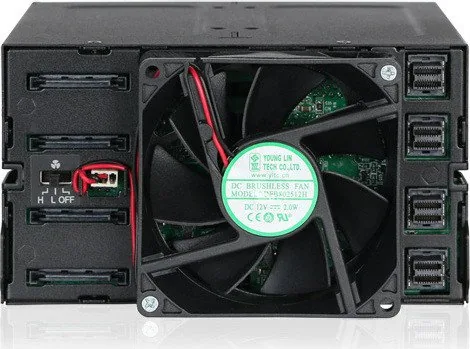
Rear View
3
操作步骤
操作步驟製品の組み込み手順につ
Installation Guide Installa Guide d'I Guía
de inst
15 Pin Power
15 Pin Power Port
3 Pin Fan Header Port
3 Pin Fan Header
miniSAS HD Connector Port
miniSAS HD Connector
3-2
3-4
3-3
H L OFF
(Optional) Insert the drive ID plug into the slot,
according to your preference.
This device accommodates drives with up to
7mm height. When placing the HDD or SSD
onto the tray
is located at the rear of the tray
Flip to the bottom side of the tray along with the
drive and use the included M3*4 screws to
secure the drive onto the tray
3-6
M3*4 screw x 4
3-5
HDD/SSD
3-12
1
2
3
4
5
6
7
8
1
2
3
4
5
6
7
8
3-10
3-8
HDD/SSD
Flip to the top side once the drive is secured.
1
Drive ID Plug
NOTE: In order to provide sufficient power to device, we suggest to
use power cables that are not shared with other devices.