
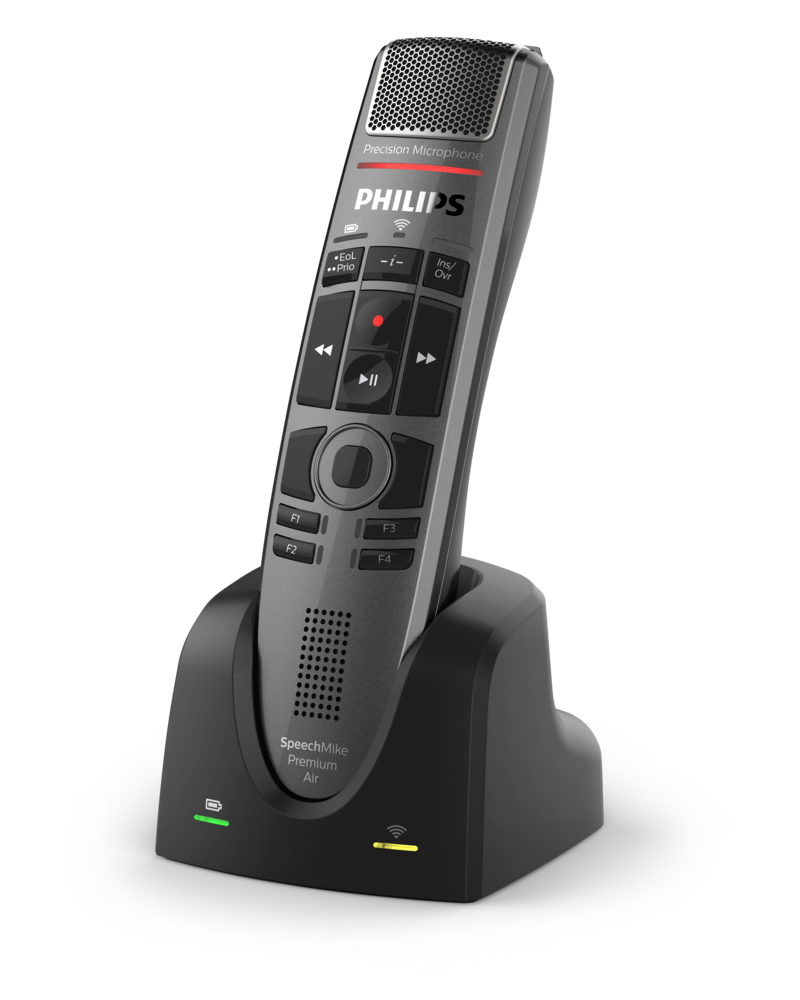


Philips SpeechMike Premium Air Docking Station Manual
PDF manual · 2 Pages
English



Advantages and Disadvantages
Advantages

- Automatic pairing restores connection when docking
- Fast, reliable charging with clear LED status
- Stable, compact base reduces desk clutter
- Optimized for high-volume dictation workflows
- Simple standardization across multiple workstations
Disadvantages

- Compatible primarily with SpeechMike Premium Air devices
- Requires desk space for permanent placement
- No portable charging when away from the dock
- Firmware or setup may need periodic updates
Ask a Question
Frequently Asked Questions
It charges the SpeechMike Premium Air and restores wireless pairing instantly, keeping the microphone ready for continuous dictation with minimal desk clutter.
Is this answer helpful?
It is designed for the SpeechMike Premium Air series. Check your exact model and the ACC4000 compatibility list before purchasing.
Is this answer helpful?
Charge times vary by battery level and environment. Expect reliable top-ups during regular docking between sessions; consult official guidance for exact timings.
Is this answer helpful?
It is designed to integrate with Philips’ ecosystem. Some configurations may require companion software and official documentation for updates.
Is this answer helpful?
Yes. Its compact, stable design suits shared desks, enabling quick handoffs and consistent charging across multiple users.
Is this answer helpful?
Yes. The dock centralizes power and pairing, minimizing loose cables and keeping your workspace organized.
Is this answer helpful?
Search for the Philips SpeechMike Premium Air Docking Station Manual or visit Philips Dictation support for the latest instructions and tips.
Is this answer helpful?
Product Description
Philips SpeechMike Premium Air Docking Station Manual
Streamlined Charging and Instant Pairing for Busy Professionals
The Philips SpeechMike Premium Air Docking Station is the seamless partner for the wireless SpeechMike Premium Air microphone. Optimized for deskside workflows, it delivers reliable charging, instant pairing, and a clean workspace—ideal for dictation-heavy environments like legal, medical, and enterprise settings.
Why It Stands Out
Engineered for stability and simplicity, the docking station provides a secure cradle that automatically aligns your device for efficient power delivery. The moment your SpeechMike docks, pairing is re-established, ensuring your microphone is always ready for the next session. LED indicators communicate charging and connection states at a glance, minimizing downtime and guesswork.
Beyond power and pairing, the dock elevates ergonomics. Its compact footprint reduces cable clutter, while the balanced weight prevents accidental tipping. Whether on a hot desk or a dedicated workstation, it integrates neatly with your existing hardware and network setup.
Designed for Daily Throughput
Built for continuous use, the dock supports frequent dock-undock cycles without degrading connection reliability. Professionals handling lengthy dictations or back-to-back sessions benefit from predictable battery replenishment and rapid readiness. Firmware-friendly by design, it helps keep your hardware ecosystem current and consistent across teams.
Who Benefits Most
- Healthcare providers needing dependable, sterile-friendly docking between rounds.
- Legal professionals requiring instant microphone readiness during client work.
- Administrators standardizing equipment across multiple workstations.
Notes
- Model reference: ACC4000 (dock for SpeechMike Premium Air).
- For setup tips and support, search: Philips SpeechMike Premium Air Docking Station Manual.
- Specifications may vary by region; check the latest guidance from Philips Dictation. \nNo reviews were provided to analyze. There is no available feedback to identify prominent positive or negative themes, product highlights, pain points, or overall sentiment. Without input, aspects such as quality, usability, performance, value, and customer support cannot be assessed. Please supply one or more reviews to enable a concise, descriptive summary.
Search for 1 Mio. Manuals online


Type-in Brand or Model